Help Desk SLA: 3 Free Templates + Best Practices (2026)
A help desk SLA (service level agreement) spells out how fast tickets get a first response and when they have to be resolved, broken down by priority. Without one, escalations happen too late and customers stop trusting your team. Below are three templates you can copy and adapt, plus a guide to enforcing them automatically in Jitbit Helpdesk.
What an SLA actually measures
An SLA sets targets for two things every support customer cares about:
- First response time - how quickly a technician acknowledges a new ticket
- Resolution time - how quickly the issue is fully resolved
Targets vary by priority, customer tier, or issue type. When one is about to be missed, the policy fires an escalation - usually an email to admins or team leads.
Key SLA metrics (and how to calculate them)
Before you write an SLA, it helps to know exactly what you are measuring. Four metrics show up in almost every support agreement:
- First Response Time (FRT) - the elapsed time between a ticket being created and the first human reply from a technician. Auto-acknowledgements do not count.
- Mean Time To Acknowledge (MTTA) - the average FRT across all tickets in a period. Formula:
MTTA = sum of all first response times ÷ number of tickets. - Mean Time To Resolve (MTTR) - the average time from ticket creation to resolution. Formula:
MTTR = sum of all resolution times ÷ number of resolved tickets. Pause the clock while the ticket is waiting on a customer reply, otherwise the number is meaningless. - SLA compliance rate - the percentage of tickets that hit their SLA target. Formula:
SLA compliance % = (tickets that met SLA ÷ total tickets) × 100. Most teams aim for 90 to 95 percent across all priorities combined.
Track FRT and MTTR separately for each priority tier - averaging them together hides exactly the failures you wrote the SLA to catch.
SLA template #1 - Standard priority-based SLA
This is the simplest and most common SLA structure. It maps each ticket priority to a response deadline, a resolution deadline, and a violation action. It works well for internal IT help desks and small-to-mid-size support teams. If you haven't defined your tiers yet, start with a P1–P5 scheme and layer the SLA on top.
| Ticket priority | Respond within | Resolve within | Action on violation |
|---|---|---|---|
| Critical | 1 hour | 3 hours | Email administrators |
| High | 2 hours | 8 hours | Email administrators |
| Normal | 4 hours | 24 hours | Email administrators |
| Low | 7 hours | 48 hours | None |
SLA template #2 - Stakeholder-aware SLA
This more nuanced SLA template adds stakeholder notifications and "clock reset" rules. It is a good fit for customer-facing SaaS companies or managed service providers (MSPs) where multiple business contacts need visibility into critical issues.
| Ticket priority | Respond within | Resolve within | Action on violation |
|---|---|---|---|
| Critical | 30 minutes; notify stakeholders ASAP | 1 hour | Email admins and stakeholders |
| High | 1 hour | 4 hours | Email administrators |
| Normal | 8 hours (overnight is acceptable) | 24 hours; reset clock on last contact | Email administrators |
| Low | 24 hours | 2 weeks | None |
SLA template #3 - Enterprise SLA with escalation tiers
This SLA template introduces multi-level escalation for unresolved issues. It is designed for enterprise environments and 24/7 operations where critical incidents can directly affect revenue or safety.
| Ticket priority | Respond within | Resolve within | Action on violation |
|---|---|---|---|
| Critical | 15 minutes (24/7) | 2 hours | Notify admins, escalate to executive team, trigger incident management |
| High | 1 hour (24/7) | 6 hours | Notify team leads and administrators |
| Normal | 4 business hours | 12 hours | Notify team leads |
| Low | 12 business hours | 3 workdays | None |
How to choose the right SLA targets
A few rules of thumb for picking response and resolution times:
- Audit your current performance. Pull your average first-response and resolution times from your help desk reports. Set targets slightly faster than your current median - ambitious but achievable.
- Segment by impact. A system-wide outage and a password reset should never share the same SLA. Tie deadlines to business impact, not just customer loudness.
- Account for business hours. Decide whether the SLA clock runs 24/7 or only during working hours. Most teams use business hours for Normal and Low priorities and 24/7 for Critical.
- Plan your escalation path. Define who gets notified at each stage - assigned technician first, then team lead, then administrator - so alerts reach the right person, not everyone at once.
- Review quarterly. SLA targets should tighten as your team improves. Schedule regular reviews so your commitments keep pace with your capabilities.
SLA vs OLA vs UC - what is the difference?
Three related agreements show up in ITIL literature and people mix them up constantly. The distinction matters because a missed SLA is often actually a missed OLA or UC underneath.
- SLA (Service Level Agreement) - external, customer facing. The promise your support team makes to the people who file tickets.
- OLA (Operational Level Agreement) - internal, between teams. For example, your help desk's SLA might require resolving a database issue in 4 hours, which depends on an OLA with the database team to acknowledge escalations within 30 minutes.
- UC (Underpinning Contract) - external, with a third-party vendor. If your hosting provider's UC promises 99.9 percent uptime, you cannot promise your customers 99.99 percent. Your SLA can never be stronger than the weakest UC it depends on.
When you draft a new SLA, walk the dependency chain backwards: SLA → OLA → UC. Every commitment you make to customers should be backed by a written commitment from every internal team and vendor in the chain.
Common SLA mistakes to avoid
Most SLAs fail for the same handful of reasons. Watch for these:
- Treating all tickets the same. A single "respond in 4 hours" rule for every ticket is not an SLA, it is a wish. Tier by priority and impact.
- Conflating response and resolution. A first response is not a fix. Track them as separate metrics with separate targets, or your team will close tickets prematurely to game the numbers.
- Ignoring business hours. If your team works 9 to 5 but the SLA clock runs 24/7, every ticket filed Friday evening is a guaranteed breach. Decide upfront which priorities use business-hours clocks and which run 24/7.
- Forgetting the "waiting on customer" pause. If the clock keeps running while a ticket is blocked on a customer reply, your MTTR is meaningless. Make sure your help desk software pauses the SLA clock during pending-customer states.
- Setting targets you cannot measure. If your tool cannot report on a metric automatically, that metric will not survive contact with reality. Pick targets your reporting can actually track.
- No escalation path. An SLA without escalation is a tripwire with nothing on the other end. Define who gets paged when a target is breached, not just that an alert fires.
- Setting it and forgetting it. SLAs need to tighten as the team gets better and loosen when the team is short-staffed. Review them every quarter against actual MTTA and MTTR data.
Enforcing SLA policies automatically with Jitbit Helpdesk
Writing an SLA template is the easy part. Enforcing it consistently is where most teams struggle. Jitbit Helpdesk solves this with its built-in automation rules engine - an "if this, then do that" system that monitors every ticket against your SLA targets and takes action the moment a violation occurs.
To set up automatic SLA enforcement, create an automation rule with these three components:
- Trigger: "Ticket has not been updated for X hours"
- Conditions: Ticket priority is "Critical" and ticket comes from "Company XYZ"
- Action: Send an email alert to administrators and the assigned technician
Create one rule per SLA policy. Name them descriptively - for example, "Critical: no response in 1 hour" or "Acme Corp: not resolved in 24 hours" - so your team can manage them at a glance.
The same rules engine can reassign overdue tickets to available technicians, bump priority, escalate to team leads, or fire a webhook to an external system.
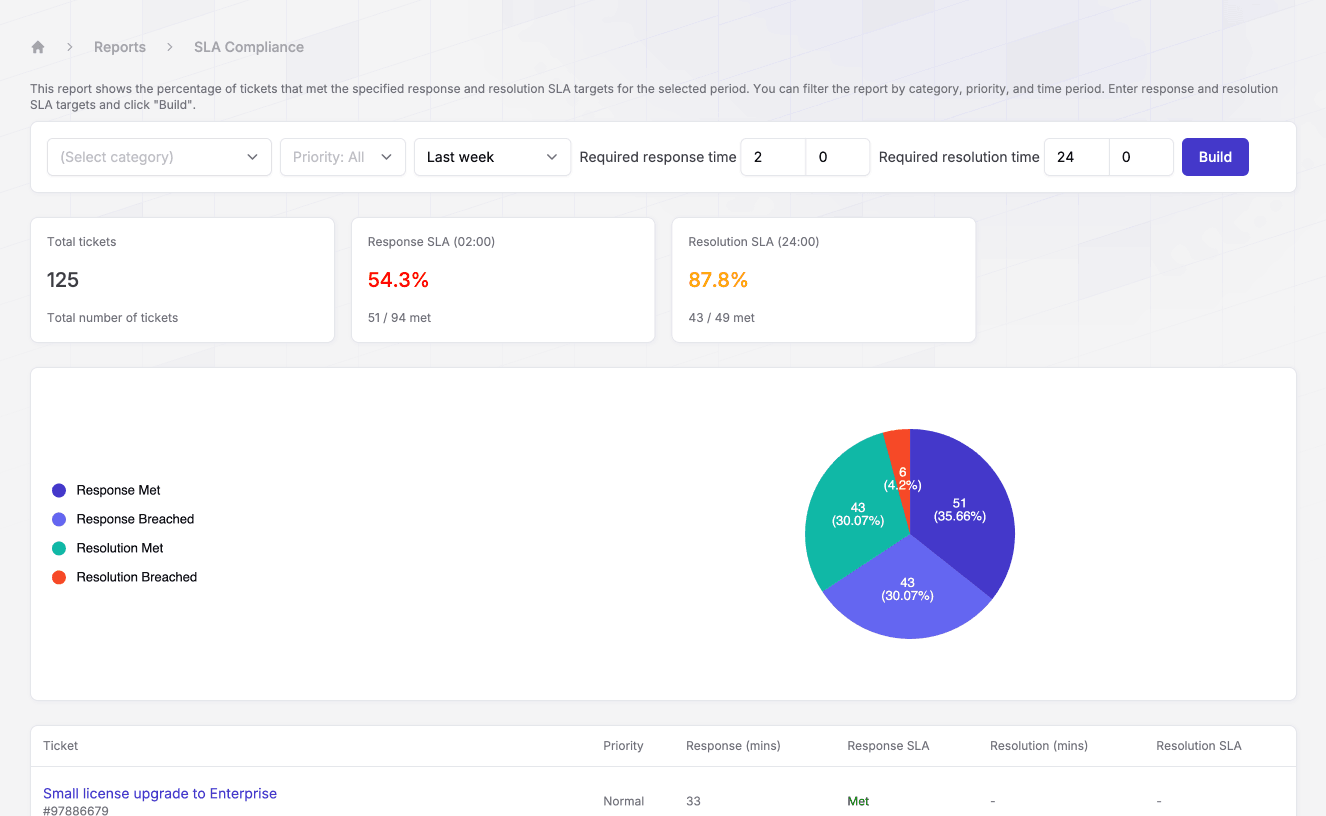
Jitbit also includes a built-in SLA compliance report that shows the percentage of tickets that met your response and resolution SLA targets for the selected period. You can filter the report by category, priority, and time period - just enter your response and resolution SLA targets and click "Build".
FAQ
What is the difference between response time and resolution time in an SLA?
Response time is how long the customer waits for a human acknowledgement of their ticket. Resolution time is how long they wait for the underlying issue to be fixed. The two are tracked separately because a fast response with a slow fix and a slow response with a fast fix are very different customer experiences.
Should the SLA clock run 24/7 or only during business hours?
For Critical and High priority tickets most teams use a 24/7 clock, because outages do not respect office hours. For Normal and Low priority tickets, business-hours clocks are standard. Pick whichever you can actually staff for - a 24/7 SLA on a 9-to-5 team is a breach generator.
What happens when an SLA is breached?
That depends on what you wrote into the policy. Internal SLAs typically trigger an escalation - an email or chat alert to a team lead or administrator, and sometimes an automatic priority bump or reassignment. External, contractual SLAs may also include service credits or refunds spelled out in the customer agreement.
What is a good SLA compliance rate?
Most mature help desk teams target 90 to 95 percent compliance across all priorities combined, with 99+ percent on Critical tickets specifically. Below 85 percent usually means your targets are too ambitious for current staffing, not that your team is failing.
Do I need a separate SLA for every customer?
Only if you sell tiered support plans. Most internal IT help desks use a single priority-based SLA that applies to everyone. SaaS companies and MSPs often run multiple SLAs - a baseline policy plus stricter targets for enterprise or premium-tier customers.
Start enforcing SLA policies today
Jitbit Helpdesk gives you everything you need to define, track, and enforce service level agreements - from built-in SLA reporting to the automation engine that keeps your team accountable. Start your free trial and have your first SLA rules running in minutes, not days.